Workflow
This page illustrates the main steps of the Lightstack algorithm.
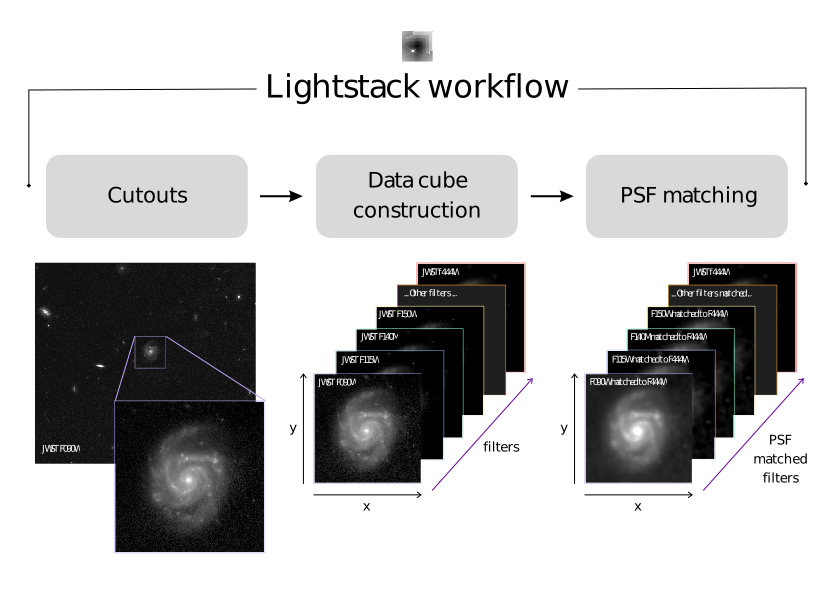
Cutouts
The first step of the pipeline (crop module) consists of extracting a region of interest from the original mosaics.
This can be done in three different ways:
DS9 region file: cropping based on a region (box) defined in DS9 and saved as a
.regfile.Square cutout: cropping a square region using RA, Dec, and size in arcseconds defined by the user.
Reference FITS: cropping based on the shape and WCS of an existing FITS file.
Data Cube Construction
The second stage of the pipeline (datacube module) consists of building a photometric data cube from the extracted regions.
First, all images are aligned and reprojected to a common reference frame. This step requires selecting a reference FITS file (i.e., a specific filter), to which all other images will be matched. It is recommended to choose a filter with a larger pixel scale to minimize information loss during reprojection. After alignment, the images are stacked to construct a 3D data cube with dimensions (RA, Dec, filter).
The data cube header is updated to include additional metadata, such as: the number of filters, the list and order of filters, the reference filter used for alignment.
Relevant information from the original 2D FITS headers (e.g., WCS and pixel scale) is preserved in the final cube.
Additional operations
This module also provides utilities for manipulating the data cube:
Filter cleaning: remove invalid filters (e.g., empty regions or partially corrupted data).
Manual filter removal: exclude specific filters defined by the user.
Header update: add more metadata (galaxy redshift and central RA/Dec).
Subcube extraction: create another data cube extracting smaller regions of interest (defined by the user) from the full data cube (e.g., galaxy center or substructures).
PSF Matching
The final stage of the pipeline (psf module) consists of homogenizing the spatial resolution across all filters through PSF matching.
This step assumes that the PSFs for each filter are already available as FITS files. The package does not generate PSFs, but provides tools to use them for matching. First, convolution kernels are constructed by selecting a reference PSF. It is recommended to choose the broadest one. Each filter in the data cube is then convolved with its corresponding kernel to match the reference PSF.
If it is necessary to recenter and resample (to a common pixel scale) the PSFs before creating the kernels, these functions are also available.
Additional Features
In addition to the main pipeline, the package provides auxiliary tools that can be used throughout different stages of the analysis. These include visualization functions (plot module) for both 2D FITS images and 3D data cubes.
The utils module contains additional functions that support the main pipeline. This also includes an unit conversion function (converting fluxes from MJy/sr to Jy/pixel).
See ‘Lightstack documentation’ for details.
If you encounter any issues with the functions, have suggestions for improvements, or would like to request new features for your specific use case, please feel free to get in touch.
You can contact me at: andressaw2@gmail.com. Or open an issue on GitHub.